What is SCCM- Introduction, Capabilities and Architectures
 William Marshal
Posted On January 21, 2020
William Marshal
Posted On January 21, 2020

What is SCCM?
System Centre Configuration Manager(SCCM) is a Microsoft Windows product that helps IT departments to manage computers from a centralized location. It was initially called as System Management Server. Microsoft SCCM helps with patch management, software deployment, remote control, operating system deployment, network protection, IT asset management and more.
Takes care of servers, laptops, desktops, mobile devices, and virtual machines (VM) that runs on Windows NT, Windows embedded, Mac, Linux/Unix, iOS and Android. It is a server-client based model, where the server can be installed on a Windows system and agents can be distributed to the intended devices.
Professionals who handle this solution for facilitating end users are called SCCM administrators.
Why is SCCM so popular and important?
SCCM is being delivered by the market leader in this system management domain ‘The Microsoft’, which creates the brand value for it by default. As the brand supports, the product itself is stable and supports extreme bandwidths, thus attracting enterprise users to own it compared to other market offerings. Diversified integrations and continuous development make Microsoft SCCM a preferred choice for the users.
Managing hundreds and thousands of machines will become an enormous task for IT administrators, especially when there are so many cyberattacks, productivity issues and data breaches, with this Microsoft solution things are centralized, managed, monitored and secured.
Understanding the Configuration Manager architecture
SCCM is from the Configuration Manager suite of Microsoft and allows customizations based on the network requirements. Configuration Manager’s architecture is at both server and client level, so to understand the architecture, it is important to understand the components associated with the server. However, the server architecture is further divided into two types, Configuration Manager components and the WBEM interface with the Configuration Manager architecture. (SMS provider)
The server is composed of service, data stores and thread components formulating the major components of the server. The data stores are of two types: configuration and system data.
Configuration Manager is an open source application that will allow users to customize scripts and automate the same for different features, for example software deployment. Please find below the WBEM interface with the SMS provider.
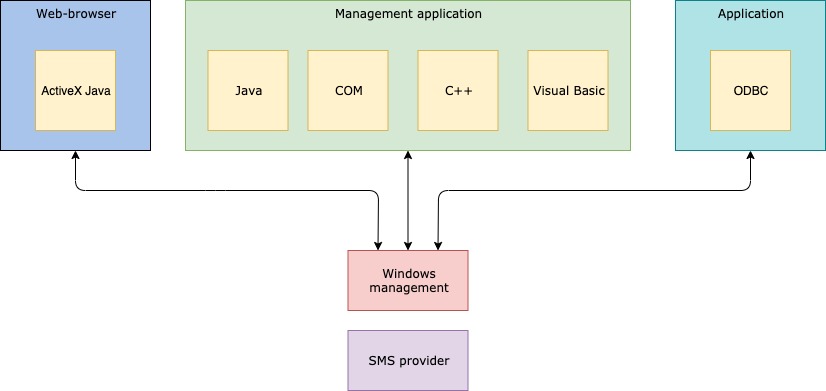
The Configuration Manager works with another component called CIM object manager (central component of WBEM), to handle the managed data. Communication to the Configuration Manager database can be directed only through CIM object manager and SMS provider, as direct communication is not possible.
Below is the architecture for Configuration Manager and windows management,
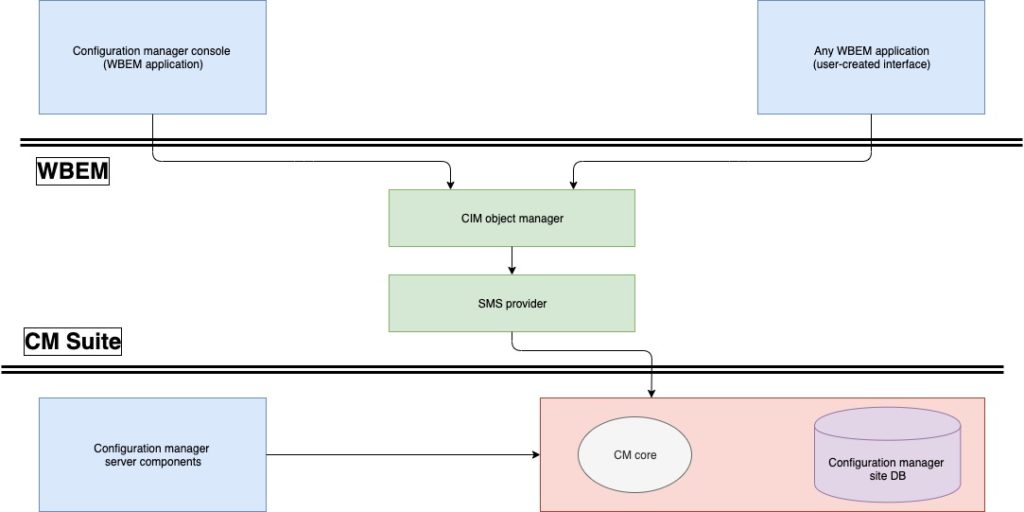
However, the client architecture is nothing but a light agent that is being run on the targeted computer, i.e; a server, a user device, or a site system that can run instantly like services, applications and process in that client deployed device wit instructions flowing from the server.
What has changed after the launch of the Microsoft Endpoint Manager?
Users will now be able to manage computers and mobile device in one single console by combining the Configuration Manager and Intune capabilities and accessing the same using the Endpoint Manager console in a unified way. Starting from branch 1910, Configuration Manager will become a part of Endpoint Manager.
Below are the Microsoft solutions that have been brought under Endpoint Manager.
- Configuration Manager
- Desktop Analytics
- Intune
- Autopilot
- Device Management Admin Console
With the launch of Endpoint Manager during the Ignite 2019, the scope and power of SCCM has become enormous.