SuperOps.ai product review and analysis- A tool for MSPs
 William Marshal
Posted On August 13, 2021
William Marshal
Posted On August 13, 2021

Remote Monitoring and Management (RMM) has always been the top name in the MSP community, the capabilities and need for a RMM tool with an integrated PSA is demanding. Even the IT departments at times prefer a RMM over a client management tool due to its versatility. In this article, we’ll see the new MSP tool in the market called ‘SuperOps.ai’ – a MSP platform with RMM and PSA capabilities. This article will be a Superops.ai product review addressing the key capabilities of the software.
SuperOps.ai was founded by Arvind Parthiban and Jayakumar Karumbasalam, the CEO and Co-founders of the firm with investors and angel investors contributing to the growth of the organization. The company believes the MSP market has software from 90th century and there is a space for modern MSP platform and wanted to deliver the same using its intuitive UI and capabilities. The founders have years of experience in building a ITSM and ITOM products already.
Overview of SuperOps.ai MSP platform
SuperOps.ai covers both the RMM and PSA side of things starting from help desk, SLA management, Client relationship management, Automation, Asset management, Alerts and Policy management, patch management, documentation and more. Furthermore, it also covers the security demands in the market. We’ll look into each of them in depth shortly. So for every MSP out there looking for a new MSP tool that could reduce your swap times and increase your efficiency. SuperOps.ai is the one you need to look at.
Installing the SuperOps.ai agentSuperOps.ai is cloud-based MSP platform, so once you sign up all you had to do is download the agent from the Asset Module and install it. The below image shows the exact location of the agent download options, once you click on it a pop will appear asking for further details on your system specifics.

Choose your client and site location for which the agent download should happen. You will be shown two options to choose from the 64 bit MSI or 86 bit MSI, pick one and start downloading the agent.

After the download of the agent file is complete, open and run it, you install wizard dialog box will open from where you can select the install location and continue to install the agent.

Meanwhile for new clients, you can create a new profile with their contact details, site configuration, custom fields and more for your reference.

SuperOps.ai product review on modules: My Workspace, Asset Management, Client Management, Reports and Charts
The SuperOps.ai has four main modules, and those are grouped based on the capabilities and process associated with one another. The first module is ‘My Workspace’, which is grouped for Tickets, Tasks and Project, and we can also call this as the PSA side of SuperOps.ai

The second module is grouped with asset, alert, patch, script and IT documentation, however we can also refer this as the RMM side of the platform. While the third and fourth modules are client management and reports/charts respectively which could also fall under the RMM category.
You can take a look at the tickets and task UI from the below image,
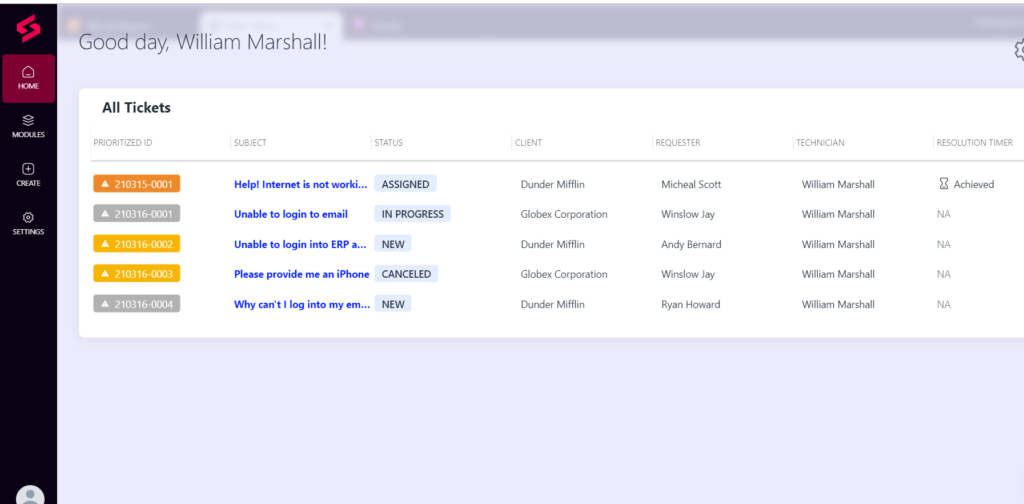

Along with these modules comes their individual settings which is available separately for configuring MSP details, technicians, service catalog, roles and groups, ticketing settings, SLA and asset policies, and more. You can check all that via the setting sicon under the create option.
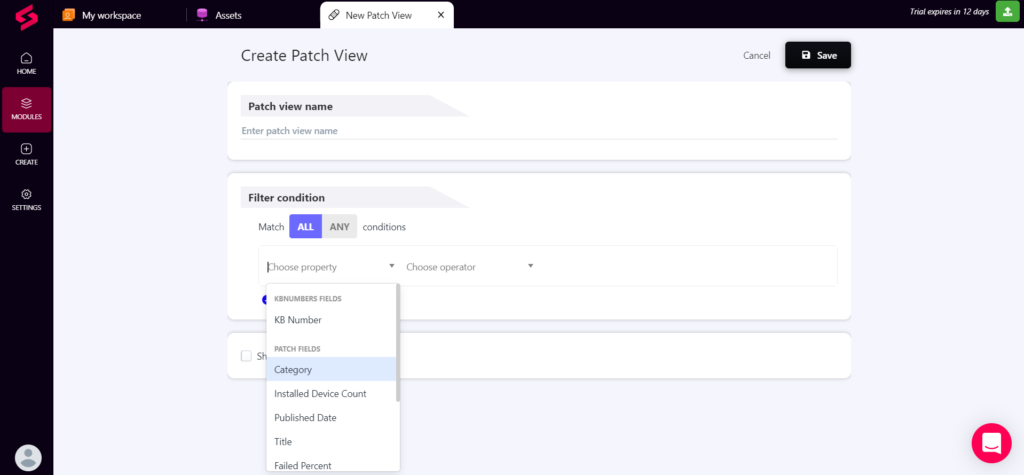
The option to create new alerts and patch view is available under the create tab and offers a wide range of customization based on different parameters like policy name, asset name, site name etc. for alerts and KB number, category, approvals, failed percent, etc. for patches.

As we move on, you can group the assets based
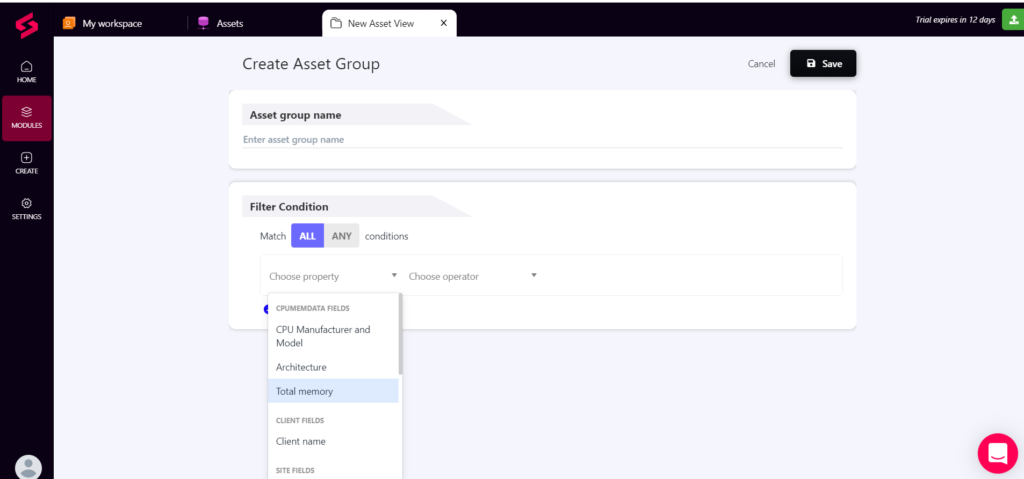
on multiple factors for easy and simple administrations. The factors include architecture, client name, CPU manufacturer, model and more.
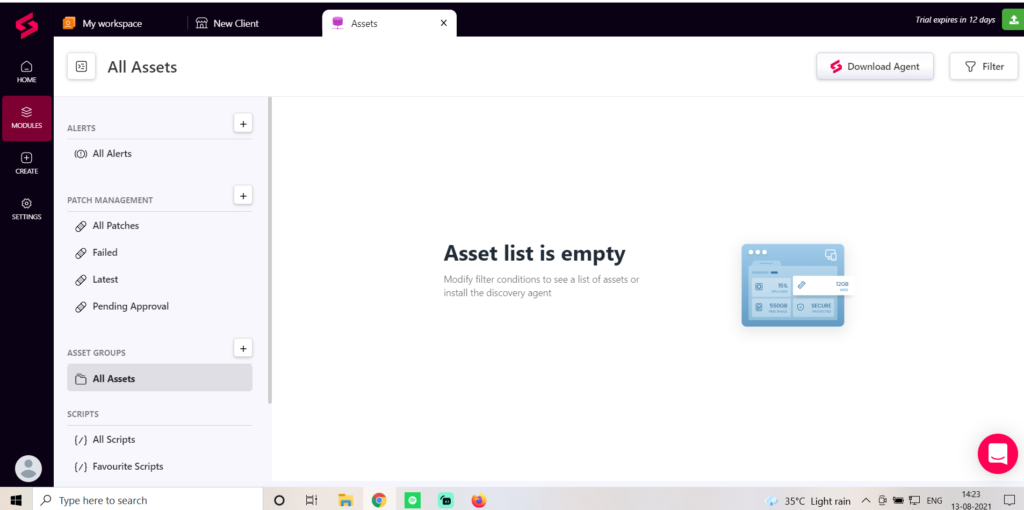
Also, the below image will depict the overall view of the asset management short, the left side tab shows the alerts, patches, scripts and more.
Option to create scripts comes with multi-language support, including PowerShell, Bat, and VB Script. And the admin can also choose the variables, files and user type for complete customization.

SuperOps.ai is a unified MSP platform with both RMM and PSA from one single console.
Give a try on SuperOps.ai and share your feedbacks in the comment section.
SuperOps.ai product review: Final say and pricing
It is available both at monthly and annual rates, and the below shows the annual pricing and the feature breakdown for each edition. The product is a perfect choice for MSP startups, small and medium scale businesses. It has a long way to approach the enterprise market, and we hope it will do so. Meanwhile, choose SuperOps.ai if your are a new or SMB MSP looking for the optimum solution with both RMM and PSA capabilities.

Hope this SuperOps.ai product review was useful to you. Subscribe to our newsletter for daily alerts on cyber events, you can also follow us on Facebook, Linkedin, Instagram, Twitter and Reddit.
You can reach out to us via Twitter or Facebook, for any advertising requests.